

Start a Blog Without Tech Skills
An Easy Beginner Blog Setup Guide

Starting a blog doesn’t have to feel like you’re trying to hack into NASA. For many new bloggers, the fear of tech stuff, hosting, domains, plugins, creates such overwhelm that they never hit “publish” on a single post. Yet, the truth is this. You can start a blog without tech skills and still build something people love to read. That’s exactly what you’re going to learn here.
In this long‑form, easy‑to‑follow guide, we’ll walk through everything from choosing a platform to promoting your content, all in a way that feels simple, fun, and totally manageable. Along the way, you’ll also see how this process ties into Internet Profit Success by building confidence, consistency, and momentum from the very beginning.
Why You Really Don’t Need Tech Skills to Start a Blog
Let’s get this out of the way You don’t need to be a coder, designer, or tech expert to start a blog. Modern blogging platforms were built for real humans, people who want to tell stories, share tips, teach skills, or connect with an audience. The tools handle the tech stuff so you can focus on what matters, your content.
Honestly, if you can open an app on your phone, you can start a blog without tech skills. It’s just about knowing which steps to take first, and then following them at your own pace.
Step 1: Choose a Blogging Platform That Does the Heavy Lifting
The first trick in the “start a blog without tech skills” playbook is to pick a blogging platform that handles the tricky parts for you.
Action Step: Choose a user‑friendly platform like WordPress.com, Blogger, or Wix. These platforms handle hosting, security, and basic setup, so you don’t have to juggle installs, servers, or code.
Why this matters:
Built‑in templates make your blog look good from the start
You don’t need to worry about DNS or database setup
You can launch fast and focus on writing
Example:
Sign up on WordPress.com, select a basic blog theme, and just update your site title and tagline. Boom, your blog framework is live.
This kind of platform beauty helps even total beginners feel like they’ve already accomplished something.

Step 2: Pick a Simple Domain Name (Custom Later)
When you first begin to start a blog without tech skills, choosing a domain, that’s your website’s address, can feel intimidating. The good news? You don’t need a custom domain right away.
Action Step: Start with a free subdomain (like yourname.wordpress.com) to begin. You can always upgrade later.
Why this helps:
• No upfront cost
• Avoids early DNS headaches
• Lets you focus on blogging, not settings
Example:
Start with yourname.wordpress.com. Once you’re ready and more confident, you can upgrade to a custom domain like yourname.com.
The goal here is progress, not perfection.
Step 3: Use a Premade Template for Design
If the thought of design makes you shudder, breathe easy. You don’t need to design your blog from scratch.
Action Step: Choose a clean, responsive theme that suits your style, without touching a line of code.
Example:
Pick a simple WordPress theme like Astra or choose Blogger’s Simple theme. Then use built‑in customizer tools to tweak colors and fonts.
Templates do the heavy design lifting so you don’t have to.
Step 4: Write Your First Posts Using an Easy Structure
Now we get to the heart of blogging: the content. A lot of beginners think they need to write a masterpiece on day one. Not true. The trick is structure.
Using a structured outline makes writing less scary, and if you need more inspiration for blog topics or creative prompts, I also use Unlock 9 Swipe File Ideas That Fuel Content Creation Fast to spark fresh ideas.”
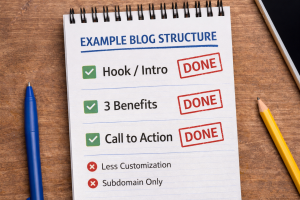
Action Step: Use a simple outline for every post:
Intro problem
Three key benefits or takeaways
Conclusion with your call to action
Example Post Title:
How to Choose Your First Email Tool
• Start by talking about why email tools feel confusing
• Share three simple benefits of picking the right tool
• Wrap up with a friendly invite to your newsletter
Another great way to generate blog ideas is to explore niche concepts tailored to your interests like those shown in ChatGPT Niche Ideas That Actually Sell From Zero to Internet Profit Success, which can help you align blogging with your passions and goals.”
This structure makes writing feel more like filling out a checklist, not staring at a blank page.
Step 5: Install Simple Plugins or Widgets (Not a Ton!)
One of the myths people worry about when they start a blog without tech skills is plugins. But you really only need one or two to get started.
Action Step: Choose just a couple of helpful plugins or widgets, nothing more.
Example:
• Jetpack – handles stats, security, and basic performance tools
• Email form widget – collects subscribers without a complicated setup
Install them, activate them, and let them do their jobs. Keep the plugin count low so you’re not overwhelmed.
Step 6: Publish Content Regularly, But Don’t Rush It
Consistency beats intensity in blogging. You don’t need to publish ten posts in a day.
Action Step: Commit to one blog post per week at first, and aim for around 500–800 words.
Example Editorial Plan:
a Week 1: What Is Affiliate Marketing?
b Week 2: How to Choose a Blog Niche
c Week 3: Easy Ways to Promote Your First Post
d Week 4: Simple Tools Every Beginner Should Know
Steady posting keeps you in the habit and helps your blog grow gradually, which is a cornerstone of long‑term Internet Profit Success.

Step 7: Promote Your Posts in Easy Ways
Once you’ve hit publish, you want real people to see your content. But here’s the secret, you don’t need a massive marketing team to do it.
A great way to get your blog into people’s inboxes is to apply the principles from Grow Your Email List Organically, which shows easy ways to build subscribers without paid ads.
Action Step:
• Share your new blog post in one or two places online
• Post it to social media or send it to your existing email contacts
• Drop it into one relevant community you’re part of
Example:
Post your link in a private Facebook group and on LinkedIn. Use a simple caption like: “New on the blog! Today I share how to choose your first email tool, hope it helps!”
Sharing posts in social communities can fuel traffic fast, check out 7 Facebook Growth Strategies That Explode Your Following Fast for simple ways to get eyeballs on your content without feeling salesy.
If your network engages with it, you’ll start building organic visibility.
Bonus Tips for Real People (Not Tech Wizards)
Use Your Voice First
Blogging isn’t about perfection, it’s about connection. Write like you speak, and your readers will feel it.
Keep Learning With Tiny Wins
A little SEO awareness, like knowing your main keyword and related phrases, will help your content get found. Tools exist to help even complete beginners do this without overwhelm.
Celebrate Each Publish
This matters more than you think. Every post is practice and progress toward your goals.
Turning Your Beginner Blog Into Internet Profit Success
Now, let’s tie this back to something bigger: your long‑term success on the internet. Starting a blog without tech skills isn’t just about getting online, it’s about building confidence, consistency, and a skill set that grows over time.
When you learn to set up your blog, write structured posts, and promote your content in smart, simple ways, you aren’t just launching a website, you’re laying the foundation for Internet Profit Success.
That can mean:
More readers
A stronger voice online
Email list growth
Engagement with your community
Income opportunities down the line
All of that starts with your first blog post. From there, every step you take builds real momentum.
Final Thoughts: You’re Closer Than You Think
If you follow this guide, choose a friendly platform, pick a simple domain, use premade templates, write with structure, install just a few helpful tools, publish regularly, and promote smartly, then you can start a blog without tech skills and actually enjoy it.
You’re not waiting for a perfect moment. You’re starting with what you have. You’re learning by doing. And you’re on the path to creating something real.
Once you’ve got momentum blogging, consider expanding your toolbox with lead magnets, 9 Steps to Create a Lead Magnet That Converts Even Beginners walks through a step‑by‑step way to collect emails and grow your audience.

So take a deep breath, pick one step from this list, and start your blog today. You’ve absolutely got this.
Use these 5 FREE VIDEOS to improve your game.

2 replies to "How to Start a Blog Without Tech Skills (Even If You’re New to This)"
A superb article, Derek, crammed with great ideas to feel confident with starting a blog. Thank you.
Thank you Margaret. I am glad you found the article helpful.