
Swipe File Ideas
9 Proven Formats That Spark Instant Creativity
If you ever stare at a blank screen and feel the ideas just… drying up, you’re not alone. Creating content consistently, whether it’s blog posts, emails, social media, or sales pages, can drain even the most energetic creators. But what if you had a secret stash of inspiration ready to go? That, my friend, is where a swipe file comes in.
In this post, we explore 9 powerful swipe file ideas, from catchy headlines and email subject lines to full‑blown outlines, that can help you speed up content creation, beat writer’s block, and consistently deliver solid content. Along the way, I’ll drop extra tips, examples, and a little nudge of humor to help you get going. And yeah, we’re sprinkling in Internet Profit Success mindset because good habits like these unlock growth and momentum.
Most new creators fall into traps that slow them down or burn them out, I break those down in The Fatal Mistakes New Internet Marketers Make, and having swipe files can prevent many of those.
What’s a Swipe File (and Why You Should Build One)
Before diving into the 9 swipe files, let’s clarify what a swipe file actually is. A “swipe file” is basically a personal collection of real‑world, high-performing (or inspiring) content, ads, emails, headlines, posts, sales pages, that you save and refer back to when you need a creative spark. It’s not about copying. Instead, it’s about learning from what works, understanding why something resonates, and applying those principles in your own voice.
When you use swipe files consistently, it feeds long-term results, especially when paired with strategies like the ones I covered in Unlock Internet Profit Success. SEO-Driven Evergreen Content for Affiliate Marketing with AI.
A swipe file is your inspiration toolbox. When you open it, you instantly have dozens of structures, hooks, and ideas ready for remixing. That’s why savvy content‑creators, copywriters, and marketers swear by them.
In addition, a swipe file helps:
Smash writer’s block by giving you pre‑tested ideas to riff on.
Show you patterns and effective psychological triggers (like urgency, social proof, curiosity) that work over and over.
Let you build content fast, especially useful when juggling multiple channels (blog, email, social).
Keep your style consistent and professional, without reinventing the wheel each time.
Alright, with that foundation, let’s dive into 9 swipe file types that can become your creative shortcuts.
1. HEADLINE SWIPE FILE
What it is
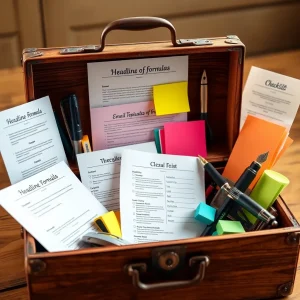
A collection of high‑impact headlines from blogs, ads, social posts, anything that immediately catches your eye and makes you want to read more.
Why it matters
A headline is like a first impression. Nail the headline, you’ve got attention. Mess it up, and you might never get a click. By studying strong headlines, you begin to internalize the patterns of what hooks people.
How to use it

Collect 10–20 high‑performing headlines over time in a document or folder.
For each headline you save, break it down: what kind of trigger does it use, curiosity? urgency? benefit? story?
Use their structure as a formula. For example, one prompt from your swipe idea list: “How to [desired outcome] in [timeframe]”. That’s a classic.
Action step: Start by grabbing 10 headlines that stopped your scroll today. Then plug in your own content details, for example: “How to write a killer blog post in 30 minutes.”
2. EMAIL SUBJECT LINE SWIPE FILE
What it is
Subject lines from emails that made you click, newsletters, promos, announcements, those that struck a chord, stirred curiosity, or offered something appealing.
Why it matters
People open emails based on the subject line alone. If that fails, nothing else matters. By studying what works, you can improve open rates and engagement as soon as you hit send.
How to use it
Each week, save 5–10 strong subject lines from your inbox (or from email campaigns you monitor).
Analyze: What made them click-worthy? A question? A promise? A benefit? A sense of urgency?
Use those patterns to craft your own subject lines when promoting a blog post, affiliate offer, or product.
Prompt you can use: “Tell me [benefit] before [timeframe] ends”, e.g. “Get your copy before Monday night.”
3. SOCIAL MEDIA POST SWIPE FILE
What it is
Posts (on TikTok, Twitter, LinkedIn, Instagram, etc.) that got high engagement, stirred emotion, taught something clear, or had a strong hook. Could be quotes, short stories, memes, tips, or threads.
Why it matters
Social media moves fast. Good content must grab attention quickly, often in seconds. By studying what stops people, what they save or share, you learn the structure of scroll‑stopping posts.
How to use it
Each week, screenshot or copy 5–10 posts that resonated.
Tag what grabbed you Was it the hook, tone, visual, story, value, or punchline?
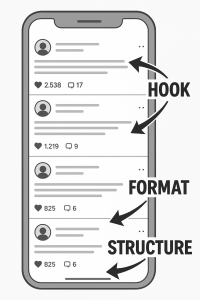
Build a library. When you need a post but brain says “meh,” open it up and riff.
Note: Don’t just grab posts from your niche. Look at totally different industries, styles, or niches, sometimes the best inspiration comes from sideways thinking.
If you want to create without showing your face, Faceless Online Business Ideas: 7 Proven Ways to Earn can give you business models where swipe files work behind the scenes.
4. CALL‑TO‑ACTION (CTA) SWIPE FILE
What it is
CTAs you encounter, on sales pages, blogs, emails, that compel action. Could be “Download your free guide,” “Grab your seat,” “Start now,” “Don’t miss out,” etc.
Why it matters
A CTA is where decision happens. Without a clear, compelling CTA, even great content can flop. Great CTAs make it easy for the audience to take the next step.
How to use it
Save 5–10 CTAs that feel strong.
Notice what makes them work: simple, direct, value-conscious, urgent, benefit‑driven.
Build your own variants based on them. For example: “Grab your [benefit] now,” “Get instant access,” “Hit the link & start,” “Don’t wait, doors close soon.”
Use them in blog posts, promo emails, social posts, or sales pages.
5. EMAIL SEQUENCE SWIPE FILE
What it is
Full email sequences, welcome series, nurture sequences, cart‑abandonment emails, launch sequences, that you’ve observed or received.
Why it matters
A single email is fine, but sequences tell a story and guide people through a journey: from awareness to curiosity to decision. Swiping good sequences gives you a map for your own.
How to use it
Save 3–5 full sequences (or parts of them). Label by purpose: welcome, nurture, promo, follow-up, etc.
Study timing, tone, pacing, structure (hook → value → CTA → follow-up).
Build your own template: e.g., a 5‑email sequence for new course subscribers, intro, pain/benefit, proof, offer, final push.
This swipe file becomes especially powerful if you’re in affiliate marketing, info‑products, or anything requiring multiple touchpoints.
6. SALES PAGE ELEMENT SWIPE FILE
What it is
Sections or elements from existing sales pages you like, hero headlines, benefit sections, bullet lists, testimonials, guarantees, CTA placement, page structure.
Why it matters
Sales pages are conversion engines. By analyzing well‑structured pages, you can reverse‑engineer the flow: hook → problem → solution → features/benefits → proof → CTA.
How to use it
Screenshot 2–3 strong sales pages per month.
Break down their structure: What came first? What got attention? How was trust built? How was the offer framed?
Use those structures when you build your own landing pages, promos, or offers.
Example: Save a sales page with a strong “Problem → Pain → Promise → Proof → Offer” flow; then, when writing your own, plug in your own angle and message.
7. FAQ SWIPE FILE
What it is
Frequently Asked Questions (and answers) from product pages, service pages, or sales funnels, basically, questions potential buyers or readers often ask, framed in a way that overcomes hesitation or objections.
Why it matters
A well‑written FAQ can ease doubts, handle objections, and simplify decision-making. If you already know common pain points, objections, or concerns, you can pre‑empt them.
How to use it
Collect 10–15 FAQs from different product or service pages each month.
Notice common objections or questions, price, value, time, risk, guarantee, process.
Use the structure + style in your own content, sales pages, launch emails, or social proof pages.
Over time, you’ll build a flexible FAQ template you can adapt anywhere.
8. TESTIMONIAL SWIPE FILE
What it is
Testimonials, reviews, case‑studies, quotes from real people describing their results from a product, course, service, or even transformation (mindset shift, change in life, etc.).
Why it matters
Proof sells. Testimonials build credibility, reduce skepticism, and show real-world results. They make your content, or offer, feel relatable and trustworthy.

How to use it
Save 5–10 strong testimonials per month (your own or others’, with permission or if public).
Break down what makes them powerful: specific result, emotional impact, relatable backstory, before/after contrast, simplicity.
Keep them handy for use in your sales pages, social proof sections, emails, or case‑study posts.
When you promote something, especially with an affiliate or course, pairing benefits with social proof tends to convert better.
9. EMAIL OR POST OUTLINE SWIPE FILE
What it is
Full outlines for blog posts, emails, or social posts: the skeleton, intro, problem, solution, benefits, CTA, of well-structured content.
Why it matters
Outlines save time and keep writing on track. When you open a blank doc and have an outline ready, you avoid the blank‑page panic and stay organized.
How to use it
Collect 5–10 outlines from good blog posts, long-form articles, newsletters, or threads.
Break them down: what came first? Hook? Story? Problem? Promise? Content? CTA?
Save those structures. When you’re ready to write, plug in your content into an existing framework rather than reinventing it.
You could even create a master “outline template file”, a go-to file to copy/paste whenever you start a new piece.
Not sure what to create content about? Start with The Best Affiliate Marketing Niches for Beginners in 2025 to find a niche that fits your style, then swipe away!
Extra Tips to Make Your Swipe File Work Like a Boss
Building a swipe file isn’t a one-off, it’s a habit. Here are some extra practices that make it way more powerful over time:
Use a simple but organized storage system. Maybe a folder in Google Drive, a Notion board, or multiple subfolders (Headline Swipes, Email Swipes, Social Post Swipes, etc.). The easier it is to retrieve something, the more you’ll use it.
Want a practical way to keep your swipe files tidy and ready to use? I shared a simple system in How to Use Google Docs for Affiliate Marketing: 9 Growth Hacks // [3NOV] that works perfectly with swipe file content.
Annotate your swipes, when you save something, add a quick note on why it worked. What got your attention? What psychological trigger did it use? The note helps you learn, not just copy.
Review and refresh regularly. Once a week, or at least once a month, go through your swipe file and drop outdated items. Add new swipes. Trends shift, so what worked a year ago may feel stale now.
Don’t just stay in your niche. Sometimes the best inspiration comes from totally different industries. A headline from a fitness blog might spark an idea for your finance article.
Use swipe + your voice = magic. The goal is not to copy, but to remix. Take what works, but deliver it in your own style, with your own language, tone, and personality.
How Swipe Files Support Internet Profit Success
If you’re hustling online, building a blog, promoting affiliate offers, sharing content on social media, or launching a digital product, swipe files can be a secret leverage tool.
Rather than starting each piece from scratch, you open your swipe file and get a head start. It saves time, reduces friction, and keeps your voice consistent even as you produce a lot. Over time, as your swipe file grows, you’ll grow, faster, smarter, and with less mental friction.
This kind of consistency and structure? That’s a core part of any Internet Profit Success journey.
Final Thoughts
If you’ve struggled with writer’s block, inconsistent posting, or just the endless pressure to come up with fresh content, treat yourself to a swipe file. Start small: maybe three categories today (headlines, subject lines, social posts).
Then build the habit: every time something grabs your attention (ad, email, post, page), screenshot or copy it, and stash it away. Annotate it. Organize it. Review it.
Once you’ve created content from your swipe files, the next step is getting it seen, and Ultimate Guide to Free Backlink Strategies 2025 is a great place to start.
Over time you’ll build a personal library of inspiration and proven techniques, a tool that helps you create better content faster, with less stress.
So what are you waiting for? Go claim your swipe file. Your content‑creation game might never be the same again.
Check out these 5 FREE VIDEOS to get a head start.
