

The Ultimate Guide to VEO3 AI Video Creation
7 Tips for Jaw‑Dropping Content

Welcome to the friendliest guide on the internet about VEO3 AI video creation, where we break down exactly how to go from zero to cinematic clip hero with just a bit of planning and smart prompting. Whether you’re a total newbie or someone who twiddles with AI tools between coffee sips, this guide gives you practical steps for powerful results.
Throughout this post, you’ll see how applying each step helps you turn ideas into scroll‑stopping AI videos, while also building your Internet Profit Success toolkit naturally and smartly.
Before we dive into the 7 steps, it’s worth remembering that strong planning and SEO fundamentals can make or break how well your content performs, which is exactly why a solid blog post SEO checklist gives you a foundation that helps AI video content and blog traffic grow together.”
Why VEO3 AI Video Creation Is the Big Deal
Before we dive into the steps, let’s get a little context.
VEO3 is Google’s latest generation of text‑to‑video AI, a model that can transform your written prompts into dynamic video clips, complete with motion, style, and even synchronized audio and dialogue if you want. It’s cutting‑edge, powerful, and still easy enough for beginners if you follow a bit of structure.
You can even use it through tools like Google Flow or free platforms that plug into Veo 3 models, making it accessible even without expensive subscriptions.
Now let’s get into the 7 steps that make the difference between meh generative clips… and actual cinematic AI videos.
Step 1: Plan Before You Prompt
One of the biggest mistakes people make with VEO3 AI video creation is just winging the prompt. You know, the “Let’s see what happens!” approach.
Sure, chaos sometimes creates art… but not when you want reliable, repeatable results. Instead, start your process like a smart creator:
Identify your video goal
Imagine your audience
Write a quick mini‑script (even just 2–3 sentences)
This mini outline gives structure to your prompt, which equips VEO3 to deliver something worth watching.
When you sketch your storyboard or video outline, consider the same principles you’d find in an SEO Checklist for Beginners, because thinking about structure early is the difference between confusion and clarity.”
Example Prompt Outline:
“Introduce the tip, show the setup, capture action, close with a call‑to‑action.”
That’s it, simple, but powerful.
When you plan first, your prompts become instructions rather than suggestions, and VEO3 responds far more predictably.
Step 2: Detail the Visual Scene
Now that you know what your video should say, tell VEO3 how it should look.
In VEO3 AI video creation, visuals aren’t abstract, they come straight from your descriptive language. So be specific:
Who’s in the video?
What are they doing?
Where is the scene set?
What’s the atmosphere like?
This is exactly where the AI shines, but only if you feed it the right details. In short, the more VEO3 understands, the better the output.
Whether you’re building blogs, videos, or shared tutorials, knowing how to get started without stressing over tech is key, just like in How to Start a Blog Without Tech Skills (Even If You’re New to This).
Example Visual Detail Prompt:
“A warm‑lit home office with a creator focused on typing, soft music in the background, relaxed but intentional vibe.”
This kind of specificity guides the model to generate a scene that looks real and engaging.

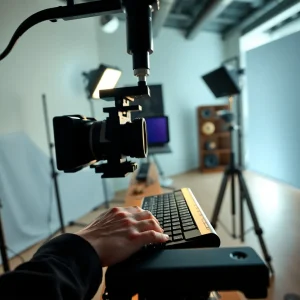
Step 3: Direct the Camera Moves and Composition
This step is where you start sounding like a director, and your videos start looking the part.
VEO3 lets you include:
Camera angles (wide shots, close‑ups)
Motion choices (dolly in, track out, etc.)
Composition styles (portrait, landscape, overhead)
These elements give movement and interest to your video. Without them, your clip might feel static or flat, even if the visuals are gorgeous.
Simple Motion Prompt:
“Start with a wide shot, then slow dolly in to close‑up on the creator’s hands typing.”
Boom, instant cinematic effect.
Step 4: Speak to the Style and Mood
Next, it’s time to define how your video should feel.
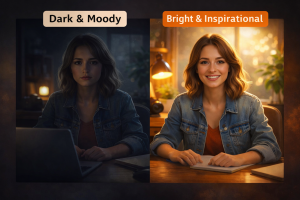
Tone matters, it’s what makes viewers stay instead of scrolling past. You can define this with two adjectives:
One for visual style (cinematic, minimal, bold)
One for emotional mood (uplifting, relaxed, intense)
For example:
Prompt Add‑On:
“Style: cinematic with bright tones. Mood: inspired and warm.”
This not only shapes the visuals, but also signals to the AI how light, color, and setting should all work together.
Step 5: Script Audio and Dialogue Clearly
Now we move into sound, and this is huge.
VEO3 can generate native audio, voice lines, and ambient sound if you ask it correctly. So, rather than leaving audio up to chance:
Specify the voice content
Mention background sound
Name any specific sound effects
Example:
“She says: ‘Use this one VEO3 step to make your videos better.’ Background: soft typing and light jazz.”
When you script the audio like this, VEO3 doesn’t guess, it executes.
Step 6: Chain Actions or Emotions for Flow
Static clips can feel… well… static. Fix that by chaining actions.
This simply means you put more than one movement or reaction in your daydreamed scene. Not only does this add dynamism, but it gives the AI context for progression and timing.
Example Prompt Sequence:
“She smiles, pauses thoughtfully, then nods as if committing to an idea.”
Small changes like this bring life and flow to your AI videos, helping them feel more organic and engaging, exactly what viewers respond to online.
Once your AI clip is out of the oven, don’t forget to squeeze extra value by repurposing that asset, a strategy I break down in 9 Clever Content Repurposing Strategies to Maximize Your Reach which helps you stretch every idea into more eyeballs
7: Refine with Scripting and Seed Control
Finally, don’t expect perfection on your first try.
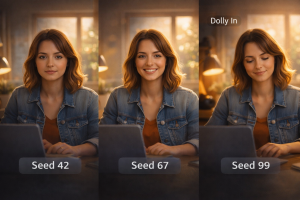
AI video models like VEO3 can be sensitive to wording and randomness (called seed control). So after your first run:
Tweak key parts of the prompt
Try different seeds
Compare outputs
Pick the best one
It’s normal for you to run multiple prompt versions before landing the clip that really pops.
Cool Tips to Improve Your VEO3 AI Video Creation
Once you’ve mastered the core steps, you can level up even more…
✦ Use Story Beats
Even short reels benefit from having a beginning, middle, and end.
✦ Vary Camera Moves
Jump cuts, push‑ins, and slow pull‑backs make scenes more dynamic.
✦ Play With Mood Swaps
Try a dramatically different mood (e.g., moody → inspirational) to see what resonates.
✦ Keep Title Cards Short
If adding text is necessary, keep it punchy and minimal.
Your Internet Profit Success Starts Here
Whether you’re creating content for social media, storytelling, product demos, or affiliate clips, mastering VEO3 AI video creation gives you a modern superpower. With these seven practical steps, from planning through refinement, your videos will not only look fantastic, but they will also work for you online.
This isn’t just technique, it’s mindset too, and if you want to build consistency and clarity into your creative workflow, the Think and Grow Rich Marketing Principles post brings a timeless perspective that ties strategic thinking to everyday execution
And that’s straight‑up beautiful.
Where should you share your finished clips? Think about pulling in steady viewers the same way a smart content creator builds visibility with a Free Traffic Action Plan and turns that attention into growth.
Wrapping Up
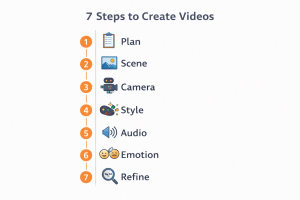
Let’s quickly recap the essentials:
1. Plan goals before you prompt
2. Detail the visual scene
3. Direct camera moves
4. Nail style and mood
5. Script audio with intention
6. Chain actions for flow
7. Refine with seed control
And if you want to round out your promotional efforts with products to share alongside your video work, here are 9 Affiliate Offers for Beginners That Actually Pay that can help you push your Internet Profit Success forward.
Follow this flow and your VEO3 clips won’t just look good, they’ll connect, engage, and help fuel your path toward Internet Profit Success in ways that feel natural and fun.
