

How to Create Content Faster: 9 Proven Time‑Saving Tips
How to Speed Up Your Workflow

Faster Content Tips
Let’s face it, creating content can feel like a never-ending hamster wheel. One minute you’re jotting down ideas, the next you’re staring at a blinking cursor wondering how you’ve been at it for two hours with absolutely nothing to show. Sound familiar? Don’t worry, you’re not alone.
Fortunately, there are smarter, faster ways to get things done. This blog post is your ultimate guide on how to create content faster without sacrificing quality or losing your mind in the process.
In this post, we’ll dive into nine solid strategies to boost your content productivity, add some bonus time-saving hacks, and sprinkle in extra tips to keep your creative juices flowing. Whether you're a full-time content creator or a side hustler squeezing out posts on lunch breaks, these strategies will help you stay visible, consistent, and sane.
When you pair speed with strategy, you not only work faster, you work smarter see content ideas to warm up your audience to keep your calendar full.
Let’s get into it.
Use Content Templates Instead of Starting from Scratch

One of the fastest ways to create content is to ditch the blank page and lean into content templates. Templates give you structure, flow, and a head start, which makes everything else come together way faster.
For example, if you're writing Instagram captions, use a simple formula like: Problem → Why It Matters → Solution → Call to Action. That framework works like a charm and saves mental energy. You can also use templates for reels, emails, carousel posts, and even stories.
These templates become even more powerful when you know what people are already clicking on, like the best ways to write social media posts that get clicks.
Build your own swipe file of go-to templates. Every time you create something that works, save it. Over time, you’ll have a treasure trove of ready-to-go formats that practically write themselves. That’s Internet Profit Success right there.
Repurpose One Piece Into Multiple Formats
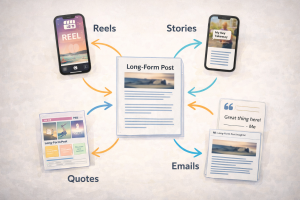
Want to know how to create content faster without doubling your effort? Repurpose like a pro. Take one big piece of content and break it into bite-sized pieces for different platforms.
Let’s say you recorded a 5-minute video explaining three beginner tips for content batching. That same video can be repurposed into a blog post, five social media quotes, two reels, one email, and a carousel. That’s one idea turning into a week’s worth of content.
Reusing content across multiple formats is one of the smartest ways to grow your reach, especially when you tap into tools that unlock the best free traffic sources for online marketing.
It’s not cheating, it’s smart. And efficient. And honestly, your audience needs repetition to remember your message anyway.
Batch Your Content Creation Sessions
Batching frees up headspace so you can focus on big‑picture growth and even dedicate time to strategies like unlock email list building for beginners. Instead of creating one thing at a time, you set aside dedicated blocks to produce multiple pieces in one go. This method saves time, mental energy, and decision fatigue.
For instance, pick one day per week to focus just on writing. Use that day to write all your social captions, plan your weekly email, and jot down story ideas. Then pick another day to record your videos or reels.
By staying in one "mode," you get into a creative flow that’s way more productive than switching gears every 30 minutes. Batching = brain efficiency.

Keep a Running List of Content Ideas
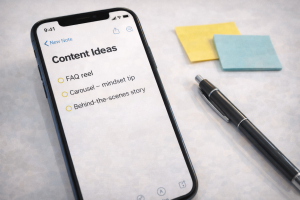
Ever sit down to create something and draw a complete blank? Yeah, same here. That’s why it’s a game-changer to keep a content idea bank. Store ideas as they come to you, in a notes app, Trello board, Google Doc, or even a physical notebook.
Capture ideas from everywhere: conversations, FAQs, DMs, books, podcasts, and even your own past content. That way, when you sit down to create, you’re not stuck thinking, you’re executing.
Having 20-50 ideas ready to go is the difference between staring at your screen and actually making content. No more panic posting.
Your idea bank becomes powerful when it’s grounded in real audience needs, like those you uncover when you unlock growth with these powerful audience research tips.
Simplify Your Formats to Create Content Faster
You don’t need to master every format on every platform. That’s a one-way ticket to burnout. Instead, pick two or three content types you enjoy and can produce quickly. Then go all-in on those.
If written content is your jam, lean into short-form posts and carousels. If you love video, stick with reels and stories. Trying to do it all slows you down.
Simplicity is your friend here. Get really good at your favorite formats, then maybe explore others once those become second nature.

Use Story Structures to Speed Up Writing
Stories are powerful, but also intimidating when you don’t know where to start. Using a simple story framework makes writing faster and easier.
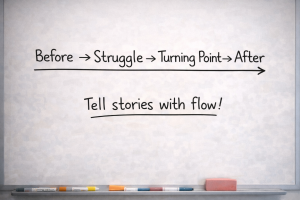
Try this one: Setup → Problem → Discovery → Lesson. Or this one: Before → Struggle → Turning Point → After.
With a clear structure, you can plug in your story beats like puzzle pieces. No more second-guessing the flow. This also makes your stories more engaging and easier to remember.
For example, if you’re telling the story of how you bombed your first reel (but now have a process), that formula helps you deliver it with impact.
Turn Frequently Asked Questions Into Content
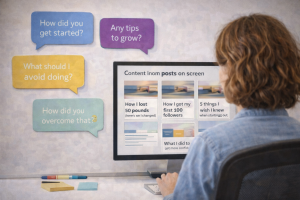
You don’t have to reinvent the wheel every week. The questions your audience already asks you? They’re goldmines for content.
Think about it. If one person asks a question, there are probably 100 more who are wondering the same thing. Use those questions as your next post, reel, or email.
Start by listing out the top 10 questions you get. Then answer each one in multiple formats. Boom. That’s content for days, and it positions you as the go-to person in your niche.
The questions your audience asks are often conversion opportunities, just like the ones covered in unlock 15 lead magnet ideas that convert inexplicably quickly and grow your email list fast.
Create a Weekly Content Theme
Decision fatigue is real. If you’re trying to wing it every day, it’ll catch up to you. Assigning themes can dramatically simplify your planning process (for example, think of the energy behind scroll stopping hooks your audience can’t ignore).
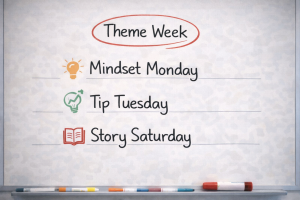
For instance, Monday could be Mindset, Tuesday could be Tips, Wednesday could be Behind-the-Scenes, and so on. That gives your week structure and simplifies your content planning.
You don’t have to stick to themes forever, but they’re super helpful when you’re starting out or want to stay consistent without burnout.
Use ChatGPT to Speed Up Drafting
AI isn’t a cheat code, it’s a time-saver. You still need to bring your own voice and perspective, but tools like ChatGPT can give you a solid starting point.
For example, ask ChatGPT to generate 10 hooks for a reel on content creation mistakes. Or get a rough draft of an email you can personalize later.
The key? Don’t copy and paste. Use it to overcome creative blocks and speed up the first draft phase

BONUS SECTION: Extra Hacks for Faster Content Creation
Now that we’ve covered the main strategies, here are a few bonus tips to crank out content even faster.
Time Yourself With the Pomodoro Method
Set a timer for 25 minutes, focus only on content creation, then take a 5-minute break. Do four of these rounds and you’ll be shocked at how much you’ve done. It’s amazing what happens when you create under pressure.
Create a Content Hub
Have one place where all your ideas, templates, drafts, and visuals live. Whether it’s Notion, Google Drive, or a simple folder system, having it organized will cut your content time in half.
Automate What You Can
Use scheduling tools to post automatically so you’re not manually uploading every day. Tools like Buffer, Later, or Meta Business Suite make this easy. Automating your workflow lets your content work for you, even when you’re offline, and it pairs well with systems like master landing page optimization to maximize conversions.
Outsource When Needed
If editing videos, designing graphics, or writing long posts isn't your thing, consider outsourcing parts of your content workflow. That frees up your time to focus on what you’re good at.
Practice Makes You Faster
Here’s the truth: the more content you create, the faster you get. Repetition builds speed. Don’t be afraid to publish imperfectly. Done is better than perfect.

Final Thoughts: How to Create Content Faster AND Better
You don’t need 20 hours a week or a team of writers to show up consistently online. You just need better systems, a few good habits, and the willingness to keep going even when your cat walks across your keyboard mid-draft.
Creating content doesn’t have to feel like a chore. With these strategies, you’ll not only create faster, you’ll enjoy the process a whole lot more.
Remember, consistency builds visibility. Visibility builds trust. And trust leads to Internet Profit Success.
So go ahead, pick one or two of these tips and try them this week. Then build from there. Before you know it, you’ll be a content machine. And of course, all of this content is more impactful when it leads to real results, such as strategies on how to convert followers into customers naturally.
Now grab that coffee, open up your content planner, and start creating. You’ve got this!
