

Marketing Automation for Beginners: 11 Time-Saving Setups
Get Your Weekly Time Back

INTRODUCTION
Marketing automation for beginners can sound like one of those phrases people toss around while holding a fancy coffee and pretending they’re not drowning in tabs. Meanwhile, you’re over here trying to post consistently, answer messages, write emails, track what’s working, and still remember to eat lunch. However, the good news is you don’t need a giant tech stack or a wizard hat to automate the repetitive stuff.
In addition, marketing automation for beginners isn’t about turning into a robot. It’s more like hiring a tiny digital assistant who never sleeps, never forgets, and never says, “Oops, I’ll do that tomorrow.” Even better, once you set up a few simple systems, your weekly workload gets lighter and your consistency gets stronger. That’s exactly the kind of boring-but-powerful momentum that leads to Internet Profit Success over time.
This long-form guide walks you through eleven beginner-friendly automations, plus extra tips, examples, and “please don’t do this” warnings so you can save hours every week. Along the way, you’ll also see how social media automation tools, a welcome email series, and automated lead magnet delivery can work together as a simple, friendly machine that supports your growth without draining your brain.
Why It Feels Hard at First
Marketing automation for beginners feels hard for one main reason: you’re usually trying to automate chaos. If your process is currently “I’ll post when I remember” and “I’ll reply when I’m not overwhelmed,” automation can’t magically fix that. On the other hand, once you turn chaos into a basic routine, automation becomes ridiculously helpful.
Another reason it feels tricky is that most people think automation has to be complicated. Meanwhile, the best beginner automations are often laughably simple. For example, scheduling your posts is automation. Setting a reminder to follow up is automation. Automatically sending a download after someone signs up is automation. None of that requires a computer science degree or a secret handshake.
Additionally, beginners often worry that automation will make them sound fake. That fear makes sense. However, the goal is to automate the repetitive actions while keeping your voice and personality intact. In other words, you automate the “delivery truck,” not the “heart.”

The “Keep It Human” Rule
Marketing automation for beginners works best when you follow one rule: automate the boring tasks, not the human connection. You can absolutely schedule content, deliver resources, and send emails automatically. Still, the magic happens when your automated systems create more time for real conversations and better ideas.
For example, if your social posts go out automatically, you can spend your time replying thoughtfully instead of scrambling to publish. Similarly, a welcome email series can handle the initial introductions, while you step in later with more personal help when it matters.
On the other hand, automation can get weird if you try to automate empathy. If someone shares a personal story in your DMs, a canned response that says, “Thanks for reaching out, valued human!” is not the vibe. Therefore, set boundaries: automate the predictable stuff, and stay present for the moments that require you.
And if you want to speed things up even more, learning how to track what’s working (without living inside dashboards) makes the whole system feel lighter.
As a result, you’ll build trust faster, you’ll feel less stressed, and your systems will actually support you instead of turning into yet another half-finished project you avoid like an awkward neighbor in the hallway.
Your Basic Tool Stack
Marketing automation for beginners doesn’t require expensive software. In fact, you can build a solid setup using free or low-cost tools, especially at the start. The trick is choosing tools that match your current level of complexity, not the version of you who has a team and a color-coded calendar.
First, you need something for scheduling posts. Social media automation tools like Meta’s planner, Buffer-style schedulers, and even built-in scheduling inside some platforms can cover the basics. Next, you need an email platform that can send automated sequences, which is where your welcome email series lives.
Then, you’ll want a simple place to store ideas and templates. That can be a notes app, a doc, or a workspace tool. After that, if you want “glue” between apps, a simple automation connector can help later, but it’s optional at the beginning.
Most importantly, keep your tool stack small. Otherwise, you’ll spend more time setting up tools than actually using them. Ironically, that’s the least automated feeling in the world.
Idea 1: Schedule Social Posts in Advance
Marketing automation for beginners often starts with the simplest win: schedule your social posts ahead of time. Posting manually every day is like deciding to brush your teeth only when you feel inspired. Technically possible, but emotionally risky.
Instead, pick one day a week to batch-create content. For example, you can write short posts, quick tips, or story prompts in one sitting. Then, load them into your scheduler and let them publish automatically. As a result, you stay consistent even on busy days, low-energy days, and “why is my brain made of soup” days.
If your captions take longer than making the actual post, borrow a few headline formulas that grab attention so you’re not reinventing the wheel every time.
To make this even easier, create a weekly rhythm. Meanwhile, your content can follow a simple pattern like tips one day, a personal story another day, and a quick lesson later in the week. In addition, keep a small library of evergreen posts you can recycle when life gets chaotic.
Also, if you’re trying to create content faster without sacrificing quality, a simple batching system makes scheduling feel almost unfair.
One more helpful tip: Don’t schedule and vanish. Automation handles posting, but you still want to check in and respond. Therefore, set a tiny daily window, even ten minutes, to engage with replies. That’s where the real relationship-building happens.

Idea 2: Build a Welcome Email Series That Warms People Up
Marketing automation for beginners becomes way more powerful when you add email. Social platforms are great, but they’re also moody. One day you reach people, the next day you’re shouting into the void. Email gives you a more reliable way to stay connected. If you want a plug-and-play starting point, follow a simple 3-email welcome sequence so new subscribers don’t fall into the ‘nice to meet you, goodbye forever’ abyss.
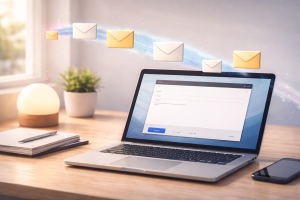
A welcome email series is a short sequence that automatically sends when someone joins your list. It introduces you, sets expectations, and helps people take a few simple next steps. Instead of you manually following up with every new subscriber, the system does it for you.
Meanwhile, strong email subject line templates can save you from writing ‘Quick question…’ for the 900th time.”
For example, your welcome email series can be five emails spread across a week. The first email delivers the resource they asked for and thanks them. The second shares your story and why you teach what you teach. The third offers a beginner tip they can use immediately. The fourth addresses a common mistake and how to avoid it. The fifth invites them to reply with their biggest question, which keeps things human.
Meanwhile, keep the tone friendly and simple. Write like you talk. Also, avoid stuffing every email with ten ideas. On the other hand, give one clear takeaway per email so it’s easy to read and easy to act on.
If you want a quick formula, try this: greet them, share one useful point, give one tiny action step, and end with a warm sign-off. That’s it. No fireworks required.
Idea 3: Automated Lead Magnet Delivery Without the Headache
Marketing automation for beginners gets a massive boost when you stop manually sending resources. If you offer a checklist, template, guide, or mini training, you don’t want to be stuck delivering it one-by-one like a tired delivery driver.
Before you automate delivery, make sure you actually create a lead magnet that converts, otherwise you’re just automating disappointment (which is impressively efficient, I guess).”
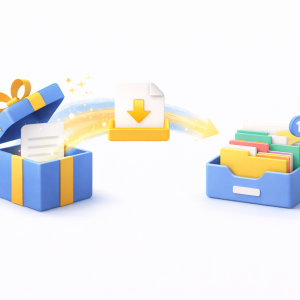
Automated lead magnet delivery means that when someone signs up, they immediately receive the resource. Instantly. Automatically. Without you doing anything. This improves the user experience and saves you a surprising amount of time. And since opt-ins live or die on the page itself, tighten up your high converting landing page elements so people know exactly what to do next
For example, someone signs up for your content planner. The system sends an email right away with the download or access instructions. Then, your welcome email series begins and helps them actually use it. As a result, people feel taken care of, and you look professional without extra effort.
“If you’re stuck choosing a freebie, these lead magnet ideas that convert will give you enough options to last longer than your current motivation burst.
On the other hand, if you want a shorter menu with solid picks, here are 13 lead magnet ideas that convert you can test quickly.
To make this work smoothly, keep the delivery email super clear. Also, include a short “what to do next” sentence. For instance, “Start with page one and choose two ideas to post this week.” Simple directions reduce overwhelm, which helps people get results.
Additionally, test it like an average person, not like a hopeful wizard. Sign up using a different email address and make sure everything arrives. If it doesn’t, fix it now, because future-you will not enjoy troubleshooting this during a busy week.
Idea 4: Capture Content Ideas on Autopilot
Marketing automation for beginners isn’t only about sending and scheduling. It’s also about capturing ideas before they disappear into the void. Content ideas have a special talent: they arrive at inconvenient times and then vanish the moment you sit down to write.
So, build an automated capture system. For example, you can dictate ideas into your phone and have them land in the same notes space every time. Meanwhile, you can create a simple “content bank” where all ideas live, so you stop scattering them across seven apps like breadcrumbs.
In addition, set a recurring reminder once or twice a week to review your idea bank. This keeps it from turning into a junk drawer full of “post about mindset” notes with no details. On the other hand, when you review it regularly, you’ll see patterns and themes that make content creation faster.
A practical example: you have a conversation in a DM where someone asks, “How do I start if I don’t have time?” Immediately save that as a content idea. Later, turn it into a post, an email, and a short video. As a result, your audience’s real questions become your best content source.
Also, keep a “one-liner” section. Sometimes the smallest thought becomes the best post. Therefore, don’t overthink it. Capture first, polish later.

Idea 5: DM Auto-Replies That Don’t Sound Weird
Marketing automation for beginners can include DM auto-replies, but you have to do it carefully. Auto-replies are best for predictable questions, like “Where do I start?” or “Do you have a beginner guide?” They’re not great for emotional or nuanced messages.
Start by identifying the top three questions you get repeatedly. Then, write friendly responses that sound like you. For example, an auto-reply can say, “Hey! If you’re just getting started, I’ve got a simple beginner guide I can send. What are you working on right now?” That gives help and invites a real reply.
Meanwhile, you can also use auto-replies to set boundaries. For instance, you can confirm you received the message and let them know when you’ll respond personally. This prevents people from feeling ignored, and it prevents you from feeling like you must answer instantly at all hours.
However, don’t over-automate your personality. One awkward mistake is using a long, salesy script that feels like a robot reciting a brochure. Instead, keep auto-replies short, helpful, and conversational.
Additionally, always include an “escape hatch.” Let people know they can ask something else, or that you’ll follow up personally. That way, automation supports the relationship instead of replacing it.

Idea 6: Analytics Reports That Show Up Like Magic
Marketing automation for beginners gets easier when you stop checking stats obsessively. Constantly refreshing analytics is like stepping on a scale every five minutes. You don’t learn more, you just get mood swings.
If you’re not sure which numbers matter yet, start with marketing metrics for beginners so your reports tell a story instead of throwing random stats at your face.
Instead, set up automatic reports where possible. Many platforms allow weekly or monthly summaries. As a result, data comes to you, and you can look at it calmly, like a responsible adult, rather than a stressed raccoon with a smartphone.
For example, choose one day a week to review performance. Look at what posts got replies, what content kept attention, and what topics seem to resonate. Meanwhile, keep it simple: pick one thing to double down on and one thing to improve.
In addition, track a few basic indicators. For instance, you might watch profile visits, email open rates, and link clicks if you use them. On the other hand, ignore vanity metrics that don’t change your decisions. If a number doesn’t help you decide what to do next, it’s just decoration.
A useful habit is writing a short weekly note: “This worked, this didn’t, next week I’ll try this.” Over time, those notes become your strategy. Therefore, automation isn’t only saving time, it’s helping you think more clearly.

Idea 7: Repurposing Content Without Copy-Paste Doom
Marketing automation for beginners can save huge time when you repurpose content intentionally. Beginners often feel like they need brand-new posts every day, which is a fast track to burnout and dramatic sighing. Even better, repurposing is one of the easiest ways to grow your email list organically because every format becomes another doorway back to your sign-up.
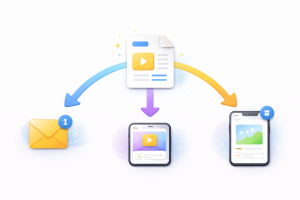
Instead, reuse your best ideas across formats. For example, one helpful post can become a short email, a simple video script, and three smaller posts. Meanwhile, your audience likely won’t see everything the first time anyway, so repeating your message is not only okay, it’s smart.
To make this easier, create a simple repurposing workflow. When something performs well, tag it as “reuse.” Then, schedule a future slot to turn it into a different format. As a result, you’re building a content engine instead of starting from zero every week.
In addition, keep a “pillar topics” list. These are your main themes, like beginner automation, consistency, and content routines. On the other hand, avoid bouncing between random topics that confuse your audience and your own brain.
A practical example: you write a post about social media automation tools for scheduling content. Next, send an email explaining your weekly batching routine. Then, record a 30-second video showing your content calendar. Same idea, three formats, less work.
Idea 8: Follow-Up Reminders So You Stop Forgetting
Marketing automation for beginners isn’t glamorous, but follow-up reminders are a secret weapon. Many beginners lose opportunities simply because they forget. Not because they’re lazy, but because life is loud and attention is limited.
So, build a reminder system that nudges you. For example, after a meaningful conversation, create a reminder for two days later. Then, follow up with a simple message like, “Hey, how did that thing go?” It’s friendly, low-pressure, and surprisingly effective.
If you want the bigger picture of how follow-ups fit into the whole machine, these lead generation strategies show how to guide people from ‘curious’ to ‘ready’ without chaos.
Meanwhile, you can also automate follow-up for collaborations, content ideas, or even your own tasks. Set reminders to review your content bank, to draft next week’s emails, or to batch record short videos.
However, keep the follow-up messages human. Automation should remind you to follow up, not send a robotic “checking in” script that sounds like you swallowed a corporate manual.
In addition, create a small rule: if it matters, it gets a reminder. That way, your brain doesn’t have to hold everything. As a result, you’ll feel calmer, you’ll be more consistent, and you’ll avoid that classic moment of “Oh no, I forgot to reply… three weeks ago.”

Idea 9: Payments, Receipts, and Delivery That Run Themselves
Marketing automation for beginners becomes extremely helpful once you offer something people can buy, whether it’s a service, a digital product, or a simple template. Manually sending invoices and files is doable at first, but it gets messy fast.
Instead, use a system that automatically handles payment confirmation, receipts, and product delivery. For example, someone purchases a template and instantly receives access instructions. Meanwhile, you get a notification and a clean record of the transaction.
This matters for two reasons. First, it saves time. Second, it reduces mistakes, like forgetting to send something or sending the wrong file. On the other hand, don’t overcomplicate it. Start with one product and one clear delivery path.
Additionally, write a simple “what happens next” message that people receive after purchase. Explain when they’ll get access, how to use the product, and how to get support if needed. As a result, fewer people will ask, “Where is it?” and you’ll spend less time answering the same question repeatedly.
Most importantly, test the whole flow. Buy your own product at a low price or use a test mode. If it works smoothly, you’ve just upgraded your professionalism without adding stress.

Idea 10: Templates That Make You Faster Overnight
Marketing automation for beginners can be as simple as templates. A template is basically automation for your brain. Instead of reinventing the wheel every time, you reuse a structure that already works.
For example, create a post template with a hook, a quick story, one tip, and a simple takeaway. Then, reuse it weekly. Similarly, create a template for emails, video scripts, and outreach messages.
Meanwhile, templates are not meant to make you boring. They’re meant to make you consistent. You still change the message, the examples, and the personality. However, the structure stays stable, which saves time and reduces decision fatigue.
A practical example: your “quick tip” template might be: problem, why it happens, one simple fix, and a friendly closing line. Once that’s saved, you can write faster because you’re not staring at a blank screen wondering where to start.
In addition, build a “swipe file” of your own best lines. When you write a sentence that feels especially clear, save it. Later, reuse and adapt it. As a result, your writing gets sharper over time, and you spend less effort trying to sound like yourself.

Idea 11: Auto-Captions and Faster Video Editing
Marketing automation for beginners can seriously reduce video creation time with auto-captions and editing tools. Video is powerful, but editing can eat entire afternoons like a hungry monster that lives inside your laptop.
Instead, use tools that automatically generate captions and speed up trimming. For example, you record a 30-second tip, drop it into an editor, and let the captions appear automatically. Then, you tweak a few lines, cut awkward pauses, and you’re done.
Meanwhile, captions help with accessibility and retention, especially when people watch without sound. In addition, auto-transcription can help you repurpose. Once you have the text, you can turn the video into a post or an email without rewriting everything from scratch.
However, don’t chase perfection. Beginners often waste time trying to make every video cinematic. On the other hand, simple and consistent beats fancy and rare. A helpful mindset is: “Clear beats clever.”
Also, create a tiny filming template. Use the same intro line, the same framing, and the same closing. As a result, recording becomes routine, and routine is basically automation wearing a hoodie.

How to Make These Systems Work Together
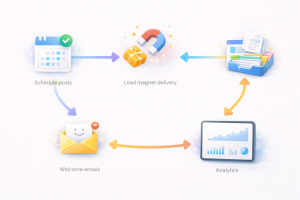
Marketing automation for beginners gets even better when you connect the pieces. Think of it like a small assembly line, except you’re not building cars, you’re building consistency.
Here’s how it can flow in real life. Someone sees your scheduled post and sends a message. Your auto-reply gives them a beginner resource. They sign up and receive automated lead magnet delivery instantly. Then your welcome email series helps them take the next steps. Meanwhile, your follow-up reminder nudges you to check in personally a couple of days later.
At the same time, your analytics report shows what content is resonating, so you can create more of it. Then your repurposing workflow turns the best idea into multiple pieces of content. In addition, templates help you produce everything faster.
The big win is that you’re not doing more. You’re doing less, but smarter. As a result, your week feels lighter, your output becomes steadier, and your growth becomes more predictable. That’s the kind of boring consistency that quietly builds Internet Profit Success.
Common Mistakes and How to Fix Them
Marketing automation for beginners can backfire if you fall into a few common traps. The first trap is trying to automate everything at once. That usually leads to half-finished setups, confusion, and you dramatically declaring, “Automation doesn’t work,” while your tools sit unused.
Instead, automate one thing, then stabilize it. Once it runs smoothly for a week or two, add the next automation. Slow is smooth, and smooth becomes fast.
Another mistake is making automations too complicated. For example, if your welcome email series has fifteen emails and seven branching paths, you’ll spend more time managing it than benefiting from it. On the other hand, a simple five-email sequence can outperform a messy monster sequence because it’s clear and actually gets finished.
Also, people sometimes forget to keep their automation updated. If you change your offer, your delivery email might still send the old resource. Therefore, set a monthly reminder to check the basics: sign-up form, automated lead magnet delivery, and your welcome email series.
Finally, watch out for “automation guilt.” If you schedule content, you might feel like you’re cheating. You’re not. You’re simply working like a sane person who values their time.
A Simple 7-Day Starter Plan
Marketing automation for beginners works best when you have a short plan that prevents overwhelm. Here’s a simple approach you can complete in one week without turning your life into a spreadsheet museum.
First Day one can be content scheduling. Batch-create a handful of posts and schedule them. Meanwhile, keep it easy. Short tips count.
Second daycan be your lead magnet delivery. Choose one resource you already have, even if it’s simple, and set up automated lead magnet delivery so people receive it instantly.
Third day can be your welcome email series outline. Write the topics for three to five emails. On the other hand, don’t write a novel. Keep it short and helpful.
Fourth day can be writing the first two emails.
Fifth day can be writing the rest and turning on the automation.
Sixth Day can be your idea capture system, so you stop losing content prompts.
Seventh day can be follow-up reminders and a basic repurposing workflow.
As a result, by the end of the week, you’ll have multiple systems working for you. Not perfect systems, but real ones that save time immediately. Then, you can improve them gradually without stress.
Final Thoughts: Lighter Workflows, More Internet Profit Success
Marketing automation for beginners isn’t about doing fewer meaningful things. It’s about removing repetitive busywork so you can focus on creativity, clarity, and real connection. When you schedule content, use social media automation tools thoughtfully, build a welcome email series, and rely on automated lead magnet delivery, you’re building a simple machine that runs even when you’re busy living your life.
Meanwhile, consistency stops being a daily struggle and becomes a weekly routine. In addition, your brain feels less cluttered because your systems handle the predictable tasks. On the other hand, you still get to show up as you, because you’re automating the delivery, not the personality.

And if you want more momentum without paying for clicks, stack these automations with free email list building techniques so your list keeps growing while you keep your sanity.
If you want an easy next step, pick two automations from this guide and set them up this week. Then, once they’re running smoothly, add the next one. That’s how you build momentum without burnout, and that steady momentum is exactly what leads to Internet Profit Success over time.
