

How to Build an Email List for Beginners
Email List Building Steps Every Newbie Can Follow

How to Build an Email List for Beginners (Even If You Hate Tech!)
Let’s get real for a minute. If you keep hearing phrases like how to build an email list for beginners and email list without tech skills and you still feel overwhelmed, you’re not alone.
Honestly, starting your first email list can feel like learning a new language you never asked to speak. But here’s the good news: you don’t need tech wizardry, expensive tools, or magic to build a list that grows and actually brings real engagement.
In this guide, we’re walking through email list building steps that are simple, actionable, funny at times, and totally doable whether you’re a total beginner or someone who just hates tech stuff. We’ll keep things light‑hearted and super practical so you stay motivated instead of confused.
Before We Jump In: What Is an Email List and Why It’s Worth It
When you’re trying to figure out how to build an email list for beginners, it helps to know why it matters. An email list is basically a group of people who said, “Yes! I want to hear from you!”
They’ve trusted you with their email address so you can send them stuff they actually care about, tips, lessons, freebies, or updates.
In a world of disappearing social posts and unbelievable algorithms, email is like owning your own little corner of the internet that doesn’t change overnight. For more tips on getting your content discovered online and supported by consistent traffic, check out the SEO Checklist for Beginners and learn simple ways to get steady visibility.And hey, Internet Profit Success (which we’ll drop in naturally throughout this post) often starts with solid, engaged subscribers, not fancy tech.
STEP 1: CHOOSE A FUN, FREE EMAIL PLATFORM
First thing’s first, you need a place to store your email list and communicate with subscribers. Since we’re focusing on email list without tech skills, this has to be easy and beginner‑friendly.
Here’s your action step:
Pick a user‑friendly service that has a free tier so you can start without paying. If you’re also planning to share content outside email and need help getting setup without tech overwhelm, this post on How to Start a Blog Without Tech Skills shows you how to launch a blog step‑by‑step with zero coding.
Platforms you can explore include MailerLite, Sender, or Mailchimp. These are set up so you don’t have to be a coder to get going.
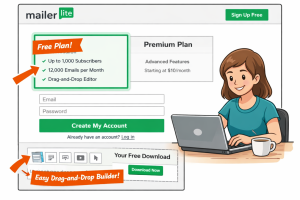
To make this real, imagine this: you sign up for MailerLite’s free plan. You instantly get a drag‑and‑drop editor (no code!), a place to save subscribers, and tools to build forms.
Your goal here isn’t perfect design, it’s starting. Once that’s done, you’ve already taken a huge step toward learning how to build an email list for beginners.
STEP 2: CREATE A SIMPLE LEAD MAGNET
Okay, so you’ve got a platform, awesome! Now you need something valuable to give people so they want to join your list. This is called a lead magnet.
A lead magnet is just something small but useful. A PDF, a checklist, a cheat sheet, or even a mini workbook.
Action Step:
Create a quick PDF or checklist that solves one tiny, specific problem for your audience.
For example, if you’re focused on social media, make a “5 Social Media Caption Templates” sheet. Use tools like Canva or Google Docs, both are free and beginner‑friendly. If you’re thinking about free downloads and freebies beyond email magnets, check out this article on Affiliate Marketing Freebies That Convert to see ideas that get real engagement.

Here’s the thing: people don’t want long ebooks they’ll never read. They want something that helps them right now. That’s the secret sauce of email list growth: solve a real tiny problem really well.
By doing this you’re not just learning how to build an email list for beginners, you’re giving them something worth joining for.
STEP 3: SET UP A BASIC SIGN‑UP FORM
Now you need a place where people can type their email and hit “send.”
Your action step:
Set up a simple sign‑up form and add it to your blog, bio, or social media profiles.
You know what? You don’t need fancy popups or complicated tech. A basic form with one field (email address only) works just fine!
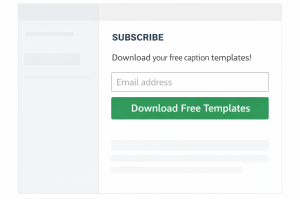
For example, on MailerLite you can grab your form code or link and drop it in your website sidebar or Instagram bio. Boom, now people can add themselves to your list.
If you’ve wondered how to build an email list for beginners without any tech headaches, this step proves it’s possible.
Pro tip:
Add a quick line under the form describing what they’ll get, like “Free Social Media Caption Templates.”
STEP 4: CONFIGURE A WELCOME EMAIL
Once someone joins your list, you want to say hello. This is where a welcome email comes in.
Action Step:
Automate one simple email that says thanks and delivers your lead magnet instantly.
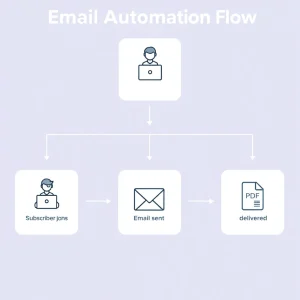
This is super important because new subscribers should feel appreciated, and you want them to get what they signed up for right now, not later.
Here’s how it works in MailerLite: you set up an automation so that when someone joins via your form, they get the PDF or checklist you promised. That’s it!
By doing this, you’re not only learning email list basics, you’re already giving your subscribers value and building trust. That’s a key part of Internet Profit Success.
STEP 5: PROMOTE YOUR LEAD MAGNET
Now that everything is set up, it’s time for a little hustle, but in a fun, non‑techie way.
Action Step:
Share your sign‑up link where your audience already hangs out. For more beginner‑friendly marketing tips that pair well with list growth, check out Michael Cheney Marketing Tips for Beginners That Actually Work, it’s full of real‑world ideas to attract your first audience.
Try these places:
• Your Instagram bio
• Your Facebook group posts
• Your LinkedIn profile
• Community forums relevant to your niche
Your goal here isn’t to spam, it’s to be helpful. You’re saying, “Hey, if you want this free cheat sheet that saves you time, go grab it here!”
You don’t need millions of followers to start seeing results. Even a small group can turn into a great email list if they care about what you’re offering. That’s essential in email list building steps that work.

STEP 6: POST CONSISTENT VALUE TO DRIVE SIGNUPS
Here’s where you begin to build momentum. Consistency is your friend.
Action Step:
Create content related to your lead magnet at least once a week, a blog post, a short video, or a social caption, and finish with a gentle prompt to join your list. If you want to pair your email list posts with content that actually shows up in search results, this Blog Post SEO Checklist walks you through how to craft posts that rank.
For example:
If your lead magnet is about writing captions, share a quick tip on LinkedIn about writing hooks, then remind readers about your free caption templates.
This does two things:
It helps people see your expertise.
It creates more opportunities for your sign‑up link to be seen.
You’re not forceful. You’re helpful. That’s the vibe that makes email list building fun even for beginners
STEP 7: TRACK AND IMPROVE YOUR OPT‑IN RATE
Finally, it’s time to look at how well your sign‑up form is performing.
Action Step:
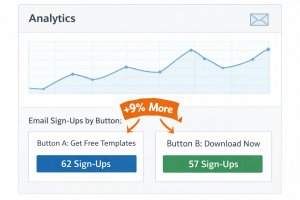
Check your opt‑in conversion rates. Try testing different headline wordings or button text and watch what happens.
Split tests like:
• “Get Free Templates”
• “Download Now”
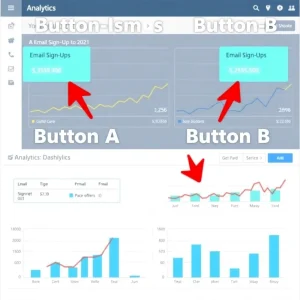
Small tweaks can make a big difference. And this step, often overlooked, is part of real‑world email list building steps that push your results forward.
You don’t have to be a data expert to do this. Your email platform gives you simple metrics, and your job is to look at them, tweak here and there, and watch what improves.
IN SUMMARY: YOUR EASY‑PEASY EMAIL LIST BLUEPRINT

Here’s the big picture of how to build an email list for beginners:
Choose a fun, free email platform that won’t stress you out.
Create a simple lead magnet people actually want.
Set up a basic sign‑up form without any tech headaches.
Configure a welcome email that delivers instantly.
Promote your lead magnet in places your audience is already hanging out.
Post consistent value that naturally drives signups.
Track and improve so your opt‑ins grow over time.
You don’t need tech skills to get started. You just need to start!
So here’s your friendly nudge: sign up for your email platform today, design your first checklist in Canva, and publish one social post linking to your lead magnet.
Before you know it, you’ll be cruising your way to Internet Profit Success, one confident email subscriber at a time. If you’re also building systems that support consistent content growth and audience attention, be sure to explore the SEO Checklist for Beginners again as you scale.
Get more help from these 5 FREE VIDEOS
