

Create a Lead Magnet That Converts
9 Steps To Use, Even If You’re a Total Beginner

If you’ve ever wondered why some freebies bring in dozens (or hundreds) of email sign‑ups while others get crickets, you’re not alone. The truth is, building a lead magnet that converts isn’t magic, it’s a process. And when you follow a simple, repeatable blueprint, you’ll stack the odds in your favor. In this post, walk through a 9‑step system that helps you create a high‑value lead magnet that grows your list, builds trust, and sets you up for Internet Profit Success (yes, I drop that phrase because it matters).
Why a Proper Lead Magnet Matters
Before we dive into the steps, let’s talk about why lead magnets are such a big deal. Your website or blog might get traffic, but traffic alone won’t build a real mailing list. A lead magnet gives visitors a reason to say yes, to exchange their email (or contact info) for something they see as valuable. When done right, a lead magnet becomes a trust-builder and a first step in a longer relationship, rather than a one-time click. If you want to skip paid ads and still grow traffic, check out our free‑traffic action plan.
In addition, mixing lead magnets with a strong content strategy and SEO helps ensure you don’t just get random sign-ups, you get useful, engaged readers.
Now, on to the 9‑step blueprint.
Step 1: Pick a High‑Value Problem to Solve

A lead magnet needs to deliver a solution, not a vague “kind-of useful maybe” guide. That means you need to zero in on one clearly defined problem your audience struggles with.
Dive into niche forums, social media groups, comment threads, or blog post comment sections. Look for recurring frustrations.
List the top 3–5 common pain points. Then choose the one that feels both urgent (people want it right now) and narrow enough to solve with a simple resource.
Pro Tip: If you’re more into behind-the-scenes business models, explore these 7 Faceless Online Business Ideas.
Example: If you’re targeting beginning bloggers who complain about not knowing how to pick their first keywords, a perfect lead magnet might be “Quick Keyword Guide for Blogging Beginners.” That solves a real pain, keyword confusion, with clear, actionable steps.
Prompt for you: Write out 3–5 specific pain points your target audience mentions frequently (e.g. “I don’t know what to write about,” “I spend hours on blog posts and get no traffic,” “I’m stuck on how to come up with catchy titles”). Then pick the one you think you can solve quickest and cleanest.
Step 2: Validate Your Idea Before Designing
Before you invest time designing and writing your lead magnet, make sure it’s something people actually want. Validation saves you from wasted effort.
Here’s what to do: craft a simple one-sentence description of your proposed lead magnet, and run it past a small group, ideally 15–30 people who match your ideal audience. Use a poll or just ask for feedback: would this resource be useful for them?
Example Poll Questions:
“Would a quick guide that helps you pick your first 5 blog post keywords be useful to you?”
“If I created a short PDF called ‘Blogging Keyword Kick‑start’, would you download it?”
If you get strong interest, you’re good to go. If not, reassess. Maybe the pain you chose isn’t painful enough. Maybe the solution isn’t clear enough.
Step 3: Choose a Simple Format Based on Value
When it comes to lead magnets, simplicity is your friend. The last thing you want is to overwhelm your audience with a bulky, long report when what they need is clarity and fast results.
Short and snappy wins. Depending on your topic, go for a checklist, swipe file, template, or quick-start guide.
Want to organize your lead magnet content more easily? Here’s how to use Google Docs for Affiliate Marketing (even if you’re not techy).
Pick a format that matches the problem you’re solving:
If your solution is a process or a checklist, go for a PDF checklist.
If it’s something that needs structure (like outlines, prompts, or fill-in-the-blank tasks), a b template or worksheet/b works best. Once your list starts growing, you can promote offers like those in our affiliate offers for beginners guide.
If it’s about step-by-step explanation, a short guide or mini‑ebook could be useful, but keep it tight.
For example: beginner bloggers often don’t know how to structure a post. A simple fill-in-the-blank blog post planner (PDF template) can save them hours.
Step 4: Outline Core Sections or Fields
Before even thinking about design, start with plain text. Draft the headings, bullet points, and any fields needed. This step makes creation so much easier, you get clarity, speed, and a roadmap for your content.
For example: if you make a lead magnet on “Writing blog posts easily”, your outline might look like:
1. Introduction, who this is for and why it helps
2. Section 1: Brainstorming Topic Ideas (with prompts)
3.Section 2: Structuring Your Post (title, intro, body, conclusion)
4. Section 3: Publishing Checklist (SEO, formatting, images)
5. Section 4: Next Steps, how to use the template effectively
Once your outline exists, writing, or building fillable templates, becomes much quicker.
Step 5: Design for Clarity and Brand Consistency
Your lead magnet doesn’t have to be fancy, but it should look clean, read well, and reflect your brand.

Use tools like Canva or Google Slides: pick a consistent accent colour, use one or two fonts maximum, add whitespace, and keep layouts simple. The goal is readability, not design gymnastics. A cluttered design can scare off users or make the content feel cheap.
Pro tip: Make sure headings stand out, the spacing is comfortable, and any fillable fields (if templates) are obvious and easy to use.
Step 6: Add a Strong Title, Header, and Intro
First impressions matter. Your title should clearly communicate what the lead magnet does and who it’s for. The header should echo that benefit, and the intro should build trust, maybe by acknowledging common pain points or letting the reader know this is a no-fluff resource.
Example Titles (for a blog-writing helper):
“5‑Minute Blog Post Planner for Busy Beginners”
“Quick Blog Post Blueprint: Write Fast, Publish Confident”
For your own lead magnet, brainstorm 5–10 title ideas. Pick the one that feels clearest and most benefit-driven.
Then write a short intro that speaks directly to your ideal reader: empathize with their struggle, promise the result, and encourage them to use the resource right away.
Step 7: Include Quick Implementation Sections
A good lead magnet isn’t just theoretical, it gets people to act.
Consider adding:
Checkbox lists
Fill-in-the-blank templates
Short exercises or prompts
Quick wins (things people can do in 5–10 minutes)
For example, if your lead magnet is a “Blog Post Planner,” add fillable fields for: post title, main point, sub‑headings, call-to-action ideas, estimated word count. This way, users don’t just read, they work. And that action builds commitment.

Step 8: End With a Next‑Step CTA
Don’t drop your audience after the lead magnet. Instead, guide them toward what’s next: maybe that’s joining your email list, reading a blog post, or grabbing another resource.
A simple closing note might say: “If you loved this planner, check out my post on blog post SEO basics,” or “Want feedback on your first post? Send me a draft.” This helps build engagement beyond the download.
Step 9: Create a Simple Delivery and Follow‑Up System
You’ve created your magnet. Now you need to deliver it, and follow up.
Pick an email service (e.g. MailerLite, ConvertKit, or any tool you like). Set it up so when someone signs up, they receive the PDF instantly. Then schedule at least two follow-up messages:
Email #1 (sent 1–2 days after): Ask if they found the magnet helpful; encourage them to reach out with questions.
Email #2 (sent 4–7 days later): Offer extra value, maybe a deeper guide, checklist, or helpful tip related to the magnet content.
This helps you nurture leads and build initial rapport.
Extra Tips & Common Mistakes to Avoid
Don’t Make It Too Broad
Lead magnets that try to solve “everything” often convert poorly. If you try to teach all of blogging, writing, SEO, graphics, social sharing, you risk overwhelming your reader. Instead, aim for one specific problem and solve it thoroughly.
Avoid Keyword Stuffing
Even though we’re writing with a main keyword in mind (e.g. “lead magnet that converts”), “stuffing” the phrase over and over won’t help. Search engines, and humans, favour natural language. Use your keywords naturally, sprinkled throughout headings and body. Don’t fall prey to common newbie traps, this post covers the mistakes that often kill early momentum.
Focus on Quality Over Quantity
Long lead magnets don’t always win. A short, punchy, actionable checklist can be far more valuable, especially if it solves a pain point quickly.
Make It Easy to Use
If your lead magnet looks good but is confusing or hard to use (poor design, no clear instructions, overloaded with text), people may delete it and tune out. Keep simplicity and clarity top of mind.
Test Often
If your first lead magnet doesn’t perform well, don’t panic, tweak and try again. Maybe the topic wasn’t on target, maybe the format isn’t ideal, or maybe your delivery process needs work. Testing and iterating is part of the process toward Internet Profit Success.
Putting It All Together, Example Walk‑Through
Let’s say you run a blog about side hustles and you notice lots of people in your audience ask:
“How do I start if I don’t have any audience?” You might:
1. Pick that pain point, “no audience, don’t know where to start.”
2. Draft a simple idea: “Side Hustle Idea Generator & Starter Checklist.” Ask 20 people in your email list or online group if they’d download it.
3. Choose format: a fillable PDF checklist + quick-start worksheet.
4. Outline sections: Intro → Brainstorm 20 side hustle ideas → Worksheet to rate them → Launch checklist → Next steps suggestions.
5. Design in Canva, clean, simple.
6. Title: “Side Hustle Kick‑Off Planner: 20‑Idea Generator + Launch Checklist.”
7. Add interactive parts: checkboxes, rating scale, blank fields.
8. Create closing note encouraging them to join a private group or read a post about first steps.
9. Automate delivery with an email tool; schedule follow-up emails, one checking in, another offering bonus resources.
If you go through those steps, and test it with your audience, you’ll likely end up with a lead magnet that gets downloads and engagement.
Using a tool like Google Docs can make your campaign planning way easier, here’s how I do it.
Why This Strategy Boosts Your Chances of Success
First, you’re solving a real problem rather than guessing what people need. That increases the chance someone will actually care about and use your lead magnet.
Second, by keeping it specific and actionable, you reduce friction and make it as easy as possible for people to say “yes.”
Third, the simplicity and clarity helps you deliver quickly and iterate faster. You’re not stuck building a monster guide; you can adjust, improve, and re-release.
Finally, by combining this with smart delivery and follow-up, and doing it consistently, you move toward Internet Profit Success, building trust, authority, and an engaged audience over time.
Final Thoughts
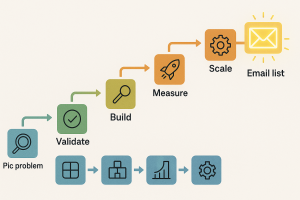
Creating a lead magnet that converts doesn’t have to be complicated. In fact, the simpler and more focused it is, the better. By following these 9 steps, from identifying a real pain point to creating a deliverable and follow-up system, you give yourself the best shot at success.
Just remember: the real power comes from delivering value and building relationships. If you stay helpful, genuine, and consistent, your lead magnet won’t just get downloads, it could become a cornerstone of your online growth.
Now go ahead, pick that pain point, sketch your outline, and start building. You’ve got this.
Here’s to your next sign‑up, and to your Internet Profit Success Learn faster by watching these 5 FREE VIDEOS
